
How to get clean Markdown from any page for an LLM
Language models read Markdown well and raw HTML badly. HTML is full of navigation, scripts, class names and tracking tags that cost tokens and add noise. This guide fetches any web page as clean Markdown, ready to paste into a prompt or split into chunks for a retrieval (RAG) index.
The request
Call POST /v1/fetch with "format": "markdown":
curl https://scrape.land/v1/fetch \
  -H "X-Api-Key: YOUR_KEY" \
  -H "Content-Type: application/json" \
  -d '{"url": "https://news.example.com/2026/09/city-opens-new-library",
       "format": "markdown",
"metadata": true}'{
"url": "https://news.example.com/2026/09/city-opens-new-library",
"status": 200,
"metadata": {
"title": "City opens new library",
"description": "The central library reopens after a two-year renovation.",
"canonical": "https://news.example.com/2026/09/city-opens-new-library"
},
"markdown": "# City opens new library\n\nThe central library reopened on Monday after a two-year renovation.\n\n## What changed\n\n- A new children's floor\n- Longer opening hours\n\n\n\nRead the [council announcement](https://news.example.com/council/library)."
}What the conversion does:
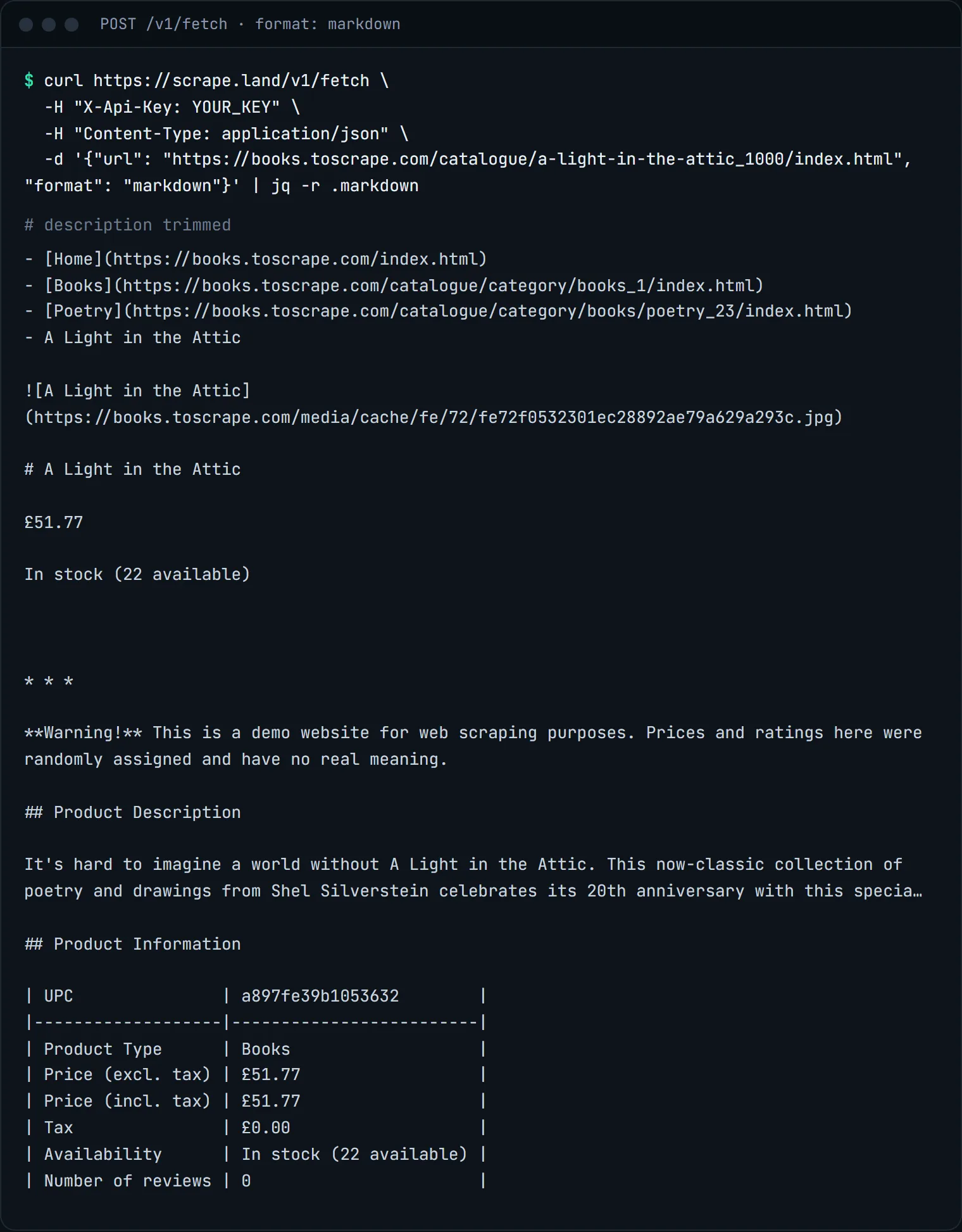
- Removes the parts of a page that are not the content:
nav,header,footer,aside, scripts, styles and inline SVG. - Keeps structure a model can use: headings, lists, links, tables and code blocks.
- Resolves relative links and image paths to absolute URLs. Once a chunk is separated from its page,
/img/3.pngmeans nothing;https://news.example.com/img/3.pngstill does.
This is what the conversion looks like on a real page. We fetched a product page from books.toscrape.com, a practice shop, as Markdown:
"metadata": true is optional. It adds the page title, description, canonical URL, OpenGraph tags and schema.org JSON-LD, which make good metadata for each chunk in your index (source URL, title, publish date).
From Markdown to chunks in Python
A simple and effective way to chunk is by heading: each section becomes a chunk, prefixed with the page title so it still makes sense on its own.
import json
import re
import requests

def page_markdown(url):
    r = requests.post(
        "https://scrape.land/v1/fetch",
        headers={"X-Api-Key": "YOUR_KEY"},
        json={"url": url, "format": "markdown", "metadata": True},
        timeout=60,
    )
    r.raise_for_status()
    return r.json()

def chunks(doc, max_chars=2000):
    title = (doc.get("metadata") or {}).get("title") or doc["url"]
    sections = re.split(r"\n(?=#{1,3} )", doc["markdown"])
    for section in sections:
        section = section.strip()
        for i in range(0, len(section), max_chars):
            yield {
                "source": doc["url"],
                "title": title,
                "text": f"{title}\n\n{section[i:i + max_chars]}",
            }

urls = [
    "https://news.example.com/2026/09/city-opens-new-library",
    "https://example.com/docs/getting-started",
]
with open("chunks.jsonl", "w", encoding="utf-8") as f:
    for url in urls:
        for c in chunks(page_markdown(url)):
            f.write(json.dumps(c, ensure_ascii=False) + "\n")
chunks.jsonl is one chunk per line, ready for whatever embedding model and vector store you use. Splitting by characters is crude; if your pages have very long sections, split on paragraphs (\n\n) inside each section instead.
Pages that need a browser
If the Markdown comes back nearly empty, the page probably builds its content with JavaScript. Add "render": true and "block_resources": true to the same request. The JavaScript guide covers when that is needed and what it costs.
Markdown, text or HTML?
- Markdown for anything a model reads. Structure and links survive, boilerplate does not.
- Text (
"format": "text") when you only want the visible words, for example for keyword counts or language detection. - HTML (the default) when your own parser needs the full document.
If you want specific facts from the page rather than all of its text, skip the chunking and ask for them directly with CSS fields or an AI prompt.
Common problems
- The Markdown is mostly a cookie notice. Some sites put their consent text in the main content area. Strip it in your own code with a short list of phrases, or render the page and add a
clickaction on the accept button. - The article is cut off. Paywalled and "read more" pages often send only the first paragraphs to anyone who is not logged in. What you get is what a logged-out visitor sees; the API does not get around paywalls.
- Tables look odd. Tables are kept as Markdown tables, which models read well. Very wide tables can still be hard to chunk; keep a table in one chunk rather than splitting it across two.
A note on scale
For many URLs, send them in parallel from your own code or use POST /v1/batch, which takes several URLs per call. The API does not crawl: you give it the list of URLs, it turns each one into Markdown. That keeps you in control of what goes into your corpus. Respect each site's terms and our Acceptable Use Policy.
What it costs
Markdown is the same price as any fetch: 1 request unit per page, on every plan including Free (1,000 requests a month, no card). There is no extra charge for the conversion. Rendering, if you need it, is 5 units or 1 with block_resources. See pricing.
Next steps
All /v1/fetch formats and options are in the docs. To let an assistant fetch pages as Markdown on its own, see using scrape.land from Claude over MCP. Sign up free to get a key.