
How to get geo-targeted results by country
Many sites answer differently depending on where the visitor is: prices in local currency, a different product range, region-locked content, localized search results, or a cookie wall that only appears in some countries. To see a page the way people in another country see it, the request has to leave from an exit IP in that country. With scrape.land that is one field, country. This tutorial sets it, checks it, and covers when it is worth using.
The request
Add a two-letter ISO country code, lower case: "us", "de", "jp", "gb" and so on.
curl https://scrape.land/v1/fetch \
  -H "X-Api-Key: YOUR_KEY" \
  -H "Content-Type: application/json" \
  -d '{"url": "https://httpbin.org/ip",
       "format": "text",
       "country": "de",
       "headers": true}'
We sent this to httpbin.org/ip, which replies with the IP it saw, and asked for the response headers with "headers": true. Among them was X-Proxy-Country, which names the country of the exit IP the request actually used. Then we repeated it with "us" and "jp":
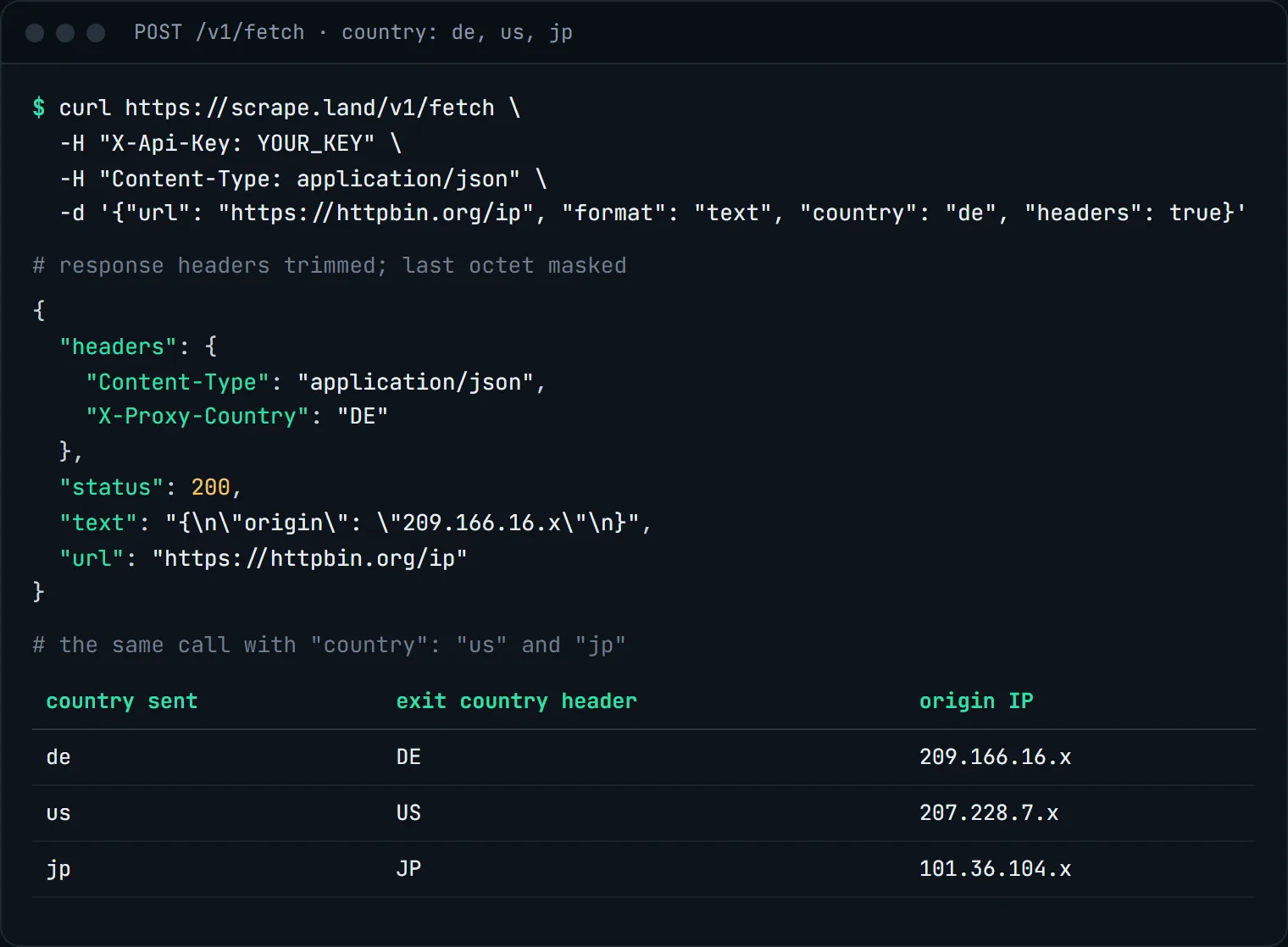
To check a country for yourself on any other setup, fetch an IP lookup service of your choice with the same country and compare what it reports.
The same thing in Python
import requests

def fetch_from(country, url):
    r = requests.post(
        "https://scrape.land/v1/fetch",
        headers={"X-Api-Key": "YOUR_KEY"},
        json={"url": url, "country": country, "format": "text"},
        timeout=60,
    )
    r.raise_for_status()
    return r.json()["text"]

for cc in ["us", "de", "jp"]:
    print(cc, fetch_from(cc, "https://httpbin.org/ip"))
Where country targeting helps
- Price and availability checks. A shop may show a different price, currency or stock level per market. Compare the same product page from each country you sell in.
- Localized content and SEO. Check which language version, redirect or canonical a site serves to visitors from each region, and whether your own site's geo redirects work.
- Ads and compliance checks. See which banners, disclaimers or consent notices appear in a given country.
- Region-locked pages. Some public pages only answer requests from their home market.
If a site also picks its language from headers, send an Accept-Language with send_headers (see custom headers and cookies). For rendered pages, "fingerprint": true makes the browser present a timezone, locale and language that match the country, so the whole visit reads as one visitor from that region.
Compare what each country gets
The useful output of a geo check is usually a difference, not a single page. Fetch the same URL from each market and compare the part you care about: a price, a currency symbol, the page title, or simply whether the page redirected. A short loop does it:
import requests

URL = "https://example.com/"  # your product or landing page
seen = {}
for cc in ["us", "gb", "de", "fr"]:
    r = requests.post("https://scrape.land/v1/extract",
                      headers={"X-Api-Key": "YOUR_KEY"}, timeout=60,
                      json={"url": URL, "country": cc,
                            "fields": {"title": "title", "lang": "html@lang"}})
    r.raise_for_status()
    seen[cc] = r.json()["data"]

for cc, data in seen.items():
    print(cc, data)
If every country prints the same thing, the page does not vary by location, and you can drop the country field for it and let requests rotate freely.
Combining country with other options
- With a session:
"country": "de", "session": "de-flow-1"keeps one German exit IP for a multi-step flow. See sticky sessions. - With rendering and screenshots:
"country": "jp", "screenshot": trueshows you the page as a visitor in Japan sees it. - On the tunnel: if you use your own HTTP client through the tunnel instead of the API, add
-country-deto your key. See rotating IPs with tunneling.
If no exit matches the filters you set, the API answers with a 502. Loosen the filter or retry.
What it costs
Nothing extra. Choosing a country is part of the fetch: each request above is 1 request unit, and you only pay for responses that land. See pricing.
Next steps
The country option and the tunnel's country suffix are in the docs. Create a free account and compare a page from two countries.