
How to send custom headers and cookies with a scrape
Sometimes the target needs more than a URL: a specific User-Agent, an Accept-Language so it answers in the right language, an Authorization header for an API, or a cookie from a session you already have. This tutorial forwards custom headers and cookies through the API and proves they arrived, using httpbin.org, a test service that echoes back what it received.
Send custom headers
Put the headers you want the target to see in send_headers, an object of name to value. They are forwarded on the request to the target, in addition to what the API sends by default.
curl https://scrape.land/v1/fetch \
  -H "X-Api-Key: YOUR_KEY" \
  -H "Content-Type: application/json" \
  -d '{"url": "https://httpbin.org/headers",
       "format": "text",
       "send_headers": {
         "User-Agent": "my-crawler/1.0 (+https://example.com/bot)",
         "Accept-Language": "de-DE",
         "X-Trace-Id": "tutorial-42"
       }}'
httpbin replies with the headers it saw. All three arrived as sent:
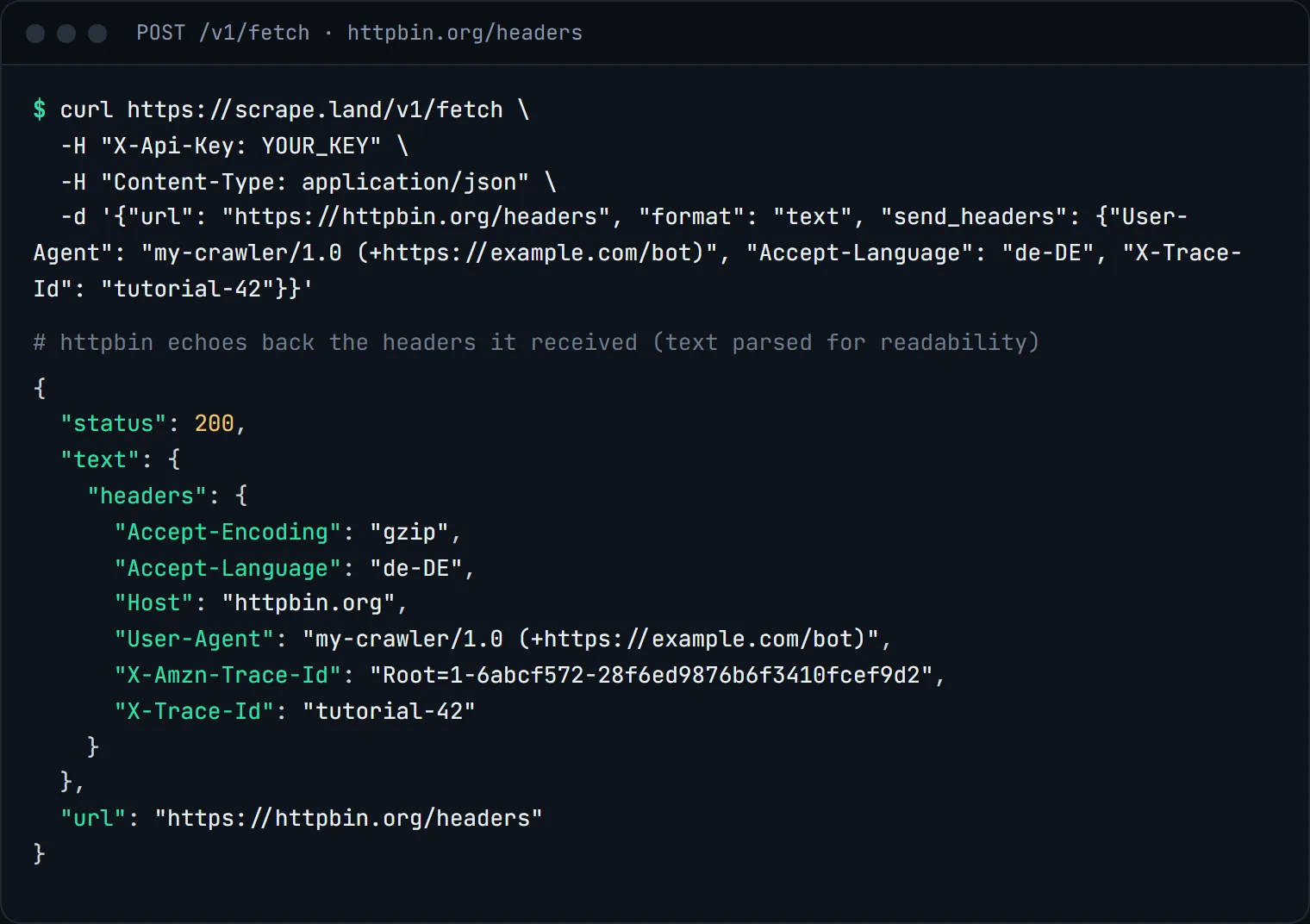
Note the two headers in your curl command are different things. X-Api-Key and Content-Type go to scrape.land and are never forwarded. Only what is inside send_headers reaches the target. A few headers that control the connection itself (such as Host and Content-Length) are dropped, and so are the internal control headers the API uses to route your request, so a forwarded header can never change how the request is routed or billed.
Send cookies
cookies takes the value of a Cookie header, exactly as a browser would send it: name=value pairs separated by ; . Add "headers": true if you also want the target's response headers back, for example to read a Set-Cookie or a redirect Location.
curl https://scrape.land/v1/fetch \
  -H "X-Api-Key: YOUR_KEY" \
  -H "Content-Type: application/json" \
  -d '{"url": "https://httpbin.org/cookies",
       "format": "text",
       "cookies": "session_id=abc123; currency=EUR",
       "headers": true}'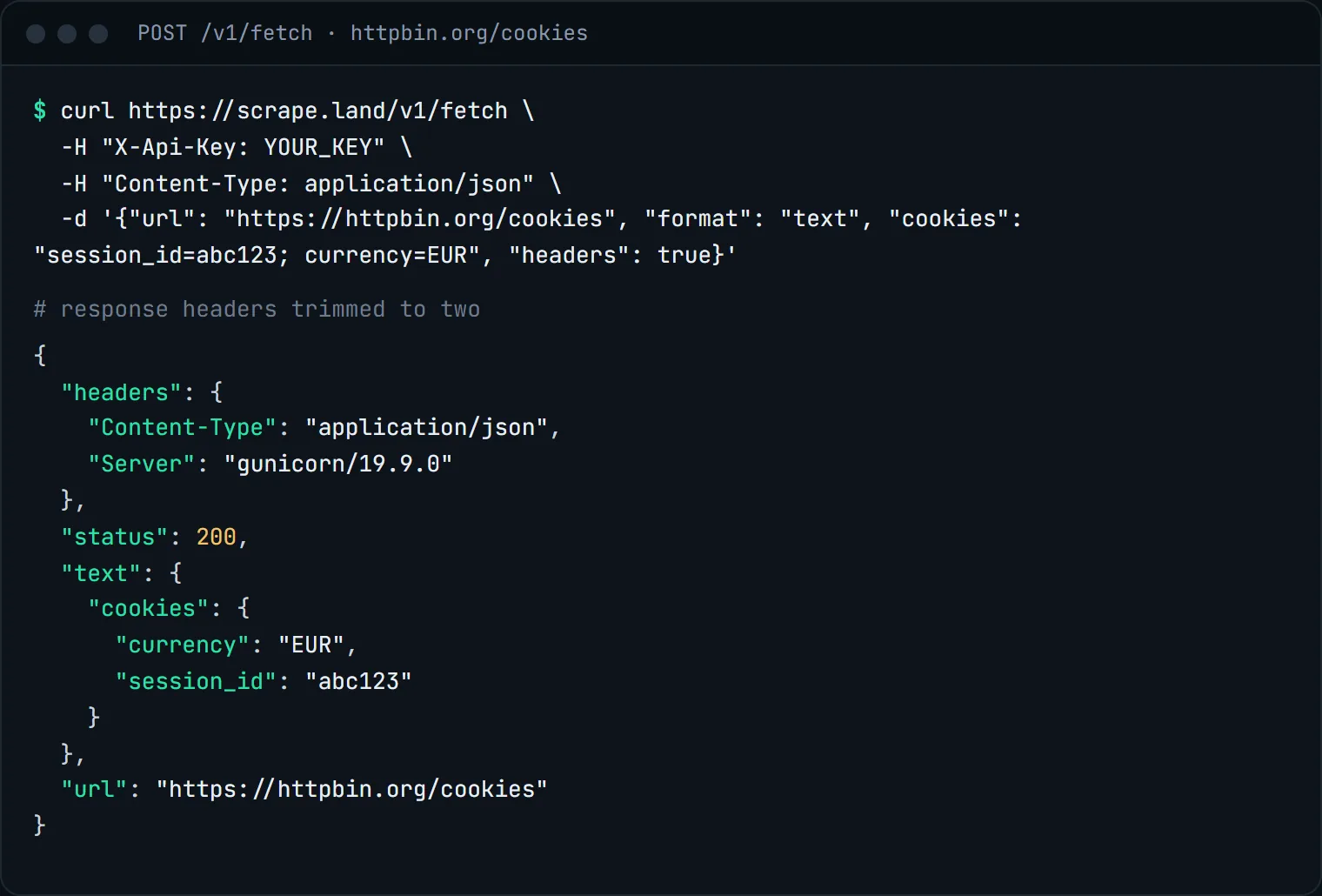
headers object holds the target's response headers (trimmed here to two).The same thing in Python
import requests

r = requests.post(
    "https://scrape.land/v1/fetch",
    headers={"X-Api-Key": "YOUR_KEY"},
    json={
        "url": "https://httpbin.org/cookies",
        "format": "text",
        "cookies": "session_id=abc123; currency=EUR",
        "send_headers": {"Accept-Language": "de-DE"},
        "headers": True,
    },
    timeout=60,
)
r.raise_for_status()
page = r.json()
print(page["status"], page["headers"].get("Content-Type"))
print(page["text"])
When to use which
- Language and region.
Accept-Languageis how many sites pick the language they answer in. Combine it with"country"when a site also looks at where the visitor is; see geo-targeted results. - APIs. Many JSON APIs want an
AuthorizationorAccept: application/jsonheader. Add"method": "POST"and a"body"to call endpoints that take a request body; set itsContent-Typeinsend_headers. Non-GET requests are never retried and cannot be combined with rendering. - Pages behind a login you own. Log in once in your browser, copy the session cookie, and send it with
cookies. Pair it with a"session"name so every call leaves from the same exit IP; some sites end a session when the IP changes (see sticky sessions). - Rendered pages.
send_headersandcookiesalso work with"render": true: the browser sends them when it loads the page.
A good citizen's User-Agent names your crawler and gives a contact URL, as in the example above. Only send cookies and credentials for accounts you are allowed to use.
What it costs
Headers, cookies and "headers": true are part of the fetch: each request above is 1 request unit. Adding "render": true makes it 5, or 1 with block_resources. See pricing.
Next steps
Every request option is listed in the docs. To interact with a page instead of sending a cookie, see fill a form and click a button. Create a free account and point the examples at httpbin to see your own headers.