
How to get page metadata and JSON-LD from any URL
Every well-built page carries a layer of data meant for machines: the <title>, a meta description, a canonical URL, OpenGraph and Twitter tags for link previews, and often schema.org JSON-LD with the product, article or organization described in structured form. Add "metadata": true to a fetch and you get all of it back as JSON, with no selectors to write. This tutorial runs it on our own homepage, which carries two JSON-LD blocks.
The request
curl https://scrape.land/v1/fetch \
  -H "X-Api-Key: YOUR_KEY" \
  -H "Content-Type: application/json" \
  -d '{"url": "https://scrape.land/", "format": "text", "metadata": true}'
The response gets a metadata object next to the page itself. "format": "text" keeps the page part small; use "markdown" if you want the content too.
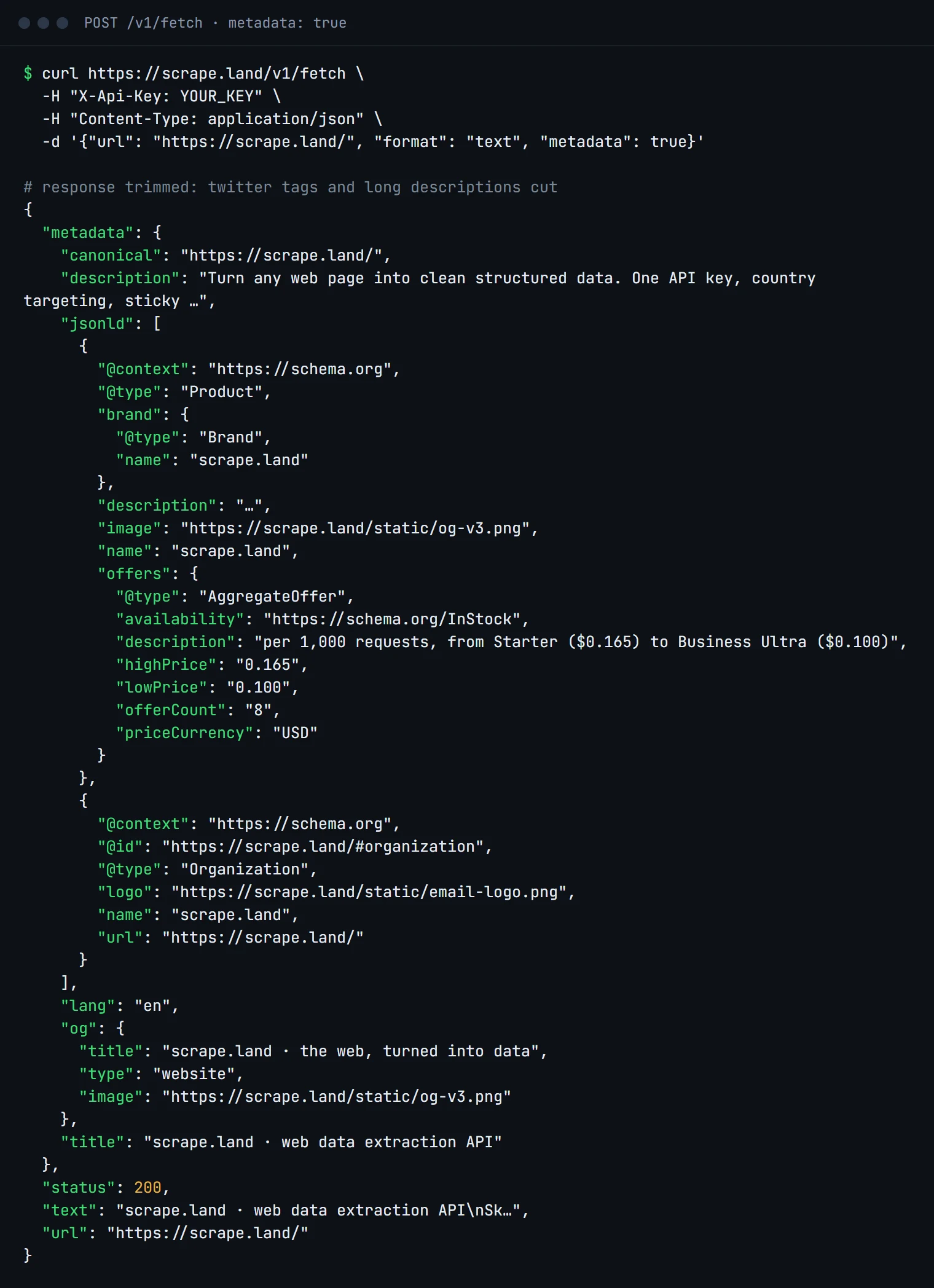
jsonld array holds both schema.org blocks from the page, already parsed.What is in the metadata object
title,description,canonicalandlang: the basics every SEO audit starts with.og: the OpenGraph tags (og:title,og:imageand so on) with the prefix removed, which is what a link preview uses.twitter: the Twitter card tags, the same way.jsonld: every<script type="application/ld+json">block, parsed into real JSON. Here that is aProductwith anAggregateOffer(a price range:"lowPrice": "0.100"to"highPrice": "0.165", currency"USD") and anOrganization.
Keys that the page does not have are simply absent, so check with .get().
Why JSON-LD is worth checking first
Shops, news sites, recipe sites and job boards publish JSON-LD because search engines read it. That means it is usually complete, consistently formatted, and more stable than the visible layout: an exact price with a currency code, an ISO publish date, an author, a rating. Before you write selectors for a page, fetch it once with metadata and look. Often the fields you want are already there, in a shape that does not change when the site is redesigned.
Link previews and SEO checks in Python
import requests

def page_meta(url):
    r = requests.post(
        "https://scrape.land/v1/fetch",
        headers={"X-Api-Key": "YOUR_KEY"},
        json={"url": url, "format": "text", "metadata": True},
        timeout=60,
    )
    r.raise_for_status()
    return r.json().get("metadata", {})

m = page_meta("https://scrape.land/")
og = m.get("og", {})
print("title:     ", og.get("title") or m.get("title"))
print("image:     ", og.get("image"))
print("canonical: ", m.get("canonical"))

for block in m.get("jsonld", []):
    offer = block.get("offers") or {}
    # a single Offer has "price"; an AggregateOffer has a lowPrice..highPrice range
    price = offer.get("price") or f'{offer.get("lowPrice")}-{offer.get("highPrice")}'
    print(block.get("@type"), price, offer.get("priceCurrency"))
Common uses: building link previews for URLs your users paste, auditing a list of your own pages for missing descriptions or wrong canonicals, and reading product or article data from the JSON-LD instead of the layout. For many URLs at once, send them to /v1/batch with the same options (see batch scraping).
Building a link preview
A preview card needs a title, a description and an image, and pages are inconsistent about where they put them. A sensible fallback order is: the OpenGraph value, then the Twitter card value, then the plain HTML value. For the title that is og.title, twitter.title, title; for the description og.description, twitter.description, description; for the image og.image, then twitter.image. Relative image URLs are worth resolving against canonical (or the page URL) before you display them. Cache the result per URL: metadata rarely changes, and a cached preview costs nothing.
One thing to know
metadata is returned by /v1/fetch and /v1/batch. In our test, /v1/extract accepted the flag but did not include a metadata object in its response, so use a fetch when you want it. AI extraction does read JSON-LD and OpenGraph on its own: a prompt sees the page's structured data along with its text (see AI schema extraction).
Metadata is read from the HTML the server sends. If a site injects its tags with JavaScript, add "render": true.
What it costs
"metadata": true adds nothing to a fetch: the request above is 1 request unit. With "render": true it is 5, or 1 with "block_resources": true. See pricing.
Next steps
The metadata option is described in the docs. To get every link from the same call, add "links": true (see extract every link). Create a free account and check your own pages.