
How to batch-scrape many URLs in one call
When you already have a list of URLs (product pages from a sitemap, results from a crawl, rows in a spreadsheet) sending them one request at a time means one round trip per page and a loop full of error handling. POST /v1/batch takes up to 20 URLs in one call and returns one result per URL, in the order you sent them. Add fields and every page is extracted the same way.
The request
Here are five product pages from books.toscrape.com. The last URL does not exist, on purpose, to show what a failed page looks like.
curl https://scrape.land/v1/batch \
  -H "X-Api-Key: YOUR_KEY" \
  -H "Content-Type: application/json" \
  -d '{"urls": [
         "https://books.toscrape.com/catalogue/a-light-in-the-attic_1000/index.html",
         "https://books.toscrape.com/catalogue/tipping-the-velvet_999/index.html",
         "https://books.toscrape.com/catalogue/soumission_998/index.html",
         "https://books.toscrape.com/catalogue/sharp-objects_997/index.html",
         "https://books.toscrape.com/catalogue/no-such-book_1/index.html"
       ],
       "fields": {
         "title": "h1",
         "price": ".product_main .price_color",
         "stock": ".product_main .availability",
         "upc": "table tr:first-child td"
       }}'
What comes back
A results array with one entry per URL, in input order. Each entry looks exactly like a single /v1/extract response: the url, the target's status, and a data object with your fields.
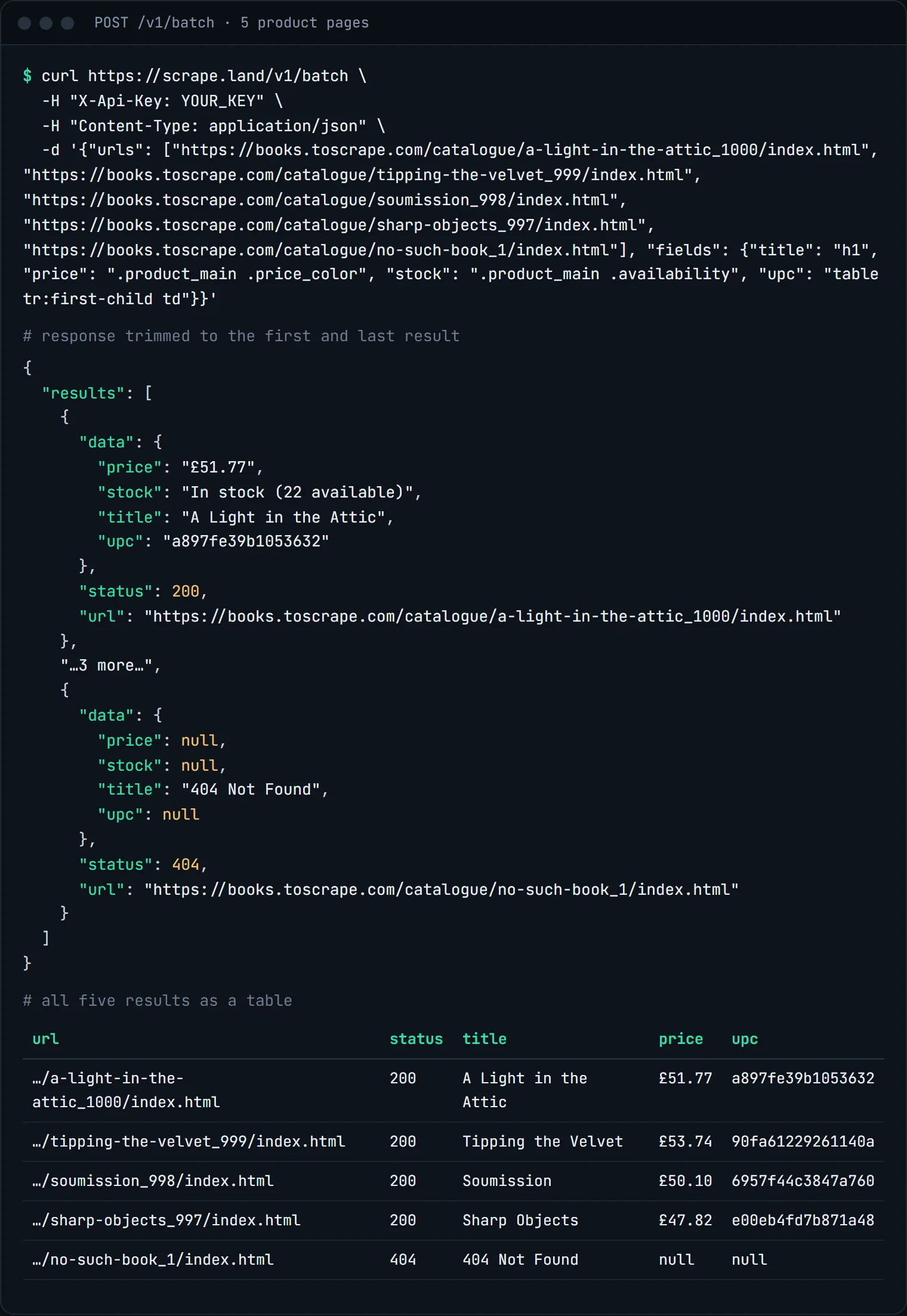
404, and its fields were read from the site's error page.The last row is the thing to design for. The target answered, just not with a product page: the status is 404, and the selectors ran against its "404 Not Found" page, so title holds that text and the other fields are null. When a URL cannot be fetched at all, its entry is {"url": ..., "error": ...} instead. Always check each entry before you trust its data.
Batching a long list in Python
For more than 20 URLs, split the list into chunks and write the rows as they arrive:
import csv
import requests

FIELDS = {
    "title": "h1",
    "price": ".product_main .price_color",
    "stock": ".product_main .availability",
    "upc": "table tr:first-child td",
}

def batches(items, size=20):
    for i in range(0, len(items), size):
        yield items[i:i + size]

urls = [line.strip() for line in open("urls.txt") if line.strip()]

with open("products.csv", "w", newline="", encoding="utf-8") as f:
    w = csv.writer(f)
    w.writerow(["url", "status", "title", "price", "stock", "upc", "error"])
    for chunk in batches(urls):
        r = requests.post(
            "https://scrape.land/v1/batch",
            headers={"X-Api-Key": "YOUR_KEY"},
            json={"urls": chunk, "fields": FIELDS},
            timeout=150,
        )
        r.raise_for_status()
        for res in r.json()["results"]:
            d = res.get("data") or {}  # a 404 still has data; filter on status later
            w.writerow([res["url"], res.get("status"), d.get("title"), d.get("price"),
                        d.get("stock"), d.get("upc"), res.get("error", "")])
Options that apply to every URL
- Any request option.
country,session,render,wait_for,send_headersand the rest are shared by all URLs in the call. - No fields? Leave out
fieldsand each result carries the page itself in theformatyou ask for:html,textormarkdown. Markdown in batches is a quick way to fill an LLM knowledge base (see clean Markdown for LLMs). - Links.
"links": truewith aformatadds each page's absolute links to its result, which makes batches a good fit for crawling (see build your own crawler). - AI. Send a
promptinstead offieldsand every page is read by the model (Scale plan and up).
When to use a job instead
A batch is still a synchronous call: your client waits until all URLs are done. For slow pages, rendered pages, or when you do not want to hold a connection open, submit the same body as an async job and poll it or get a webhook. See async jobs and webhooks.
What it costs
Each URL in a batch is billed as a separate request: 1 unit per page for plain fetches like the ones above, 5 per rendered page (1 with block_resources). There is no charge for the batch itself. Starter includes 600,000 requests a month for $99. See pricing.
Next steps
The batch endpoint is documented in the docs. To collect the URLs in the first place, see scraping a paginated catalog. Create a free account and send your first batch.