
How to fill a form and click a button before scraping
Some content only appears after you interact with the page: a search box you have to fill, a "show more" button, a tab, a login form. Rendered requests accept a short list of actions that run in the browser before the page is read. This tutorial types into a login form, clicks submit, waits, and extracts what only a signed-in visitor sees, on quotes.toscrape.com/login, a practice site that accepts any username and password.
The actions
Each action is an object with a type:
{"type": "fill", "selector": "#username", "value": "demo"}types the value into the element.{"type": "click", "selector": "input[type=submit]"}clicks the first element that matches.{"type": "wait", "ms": 3000}pauses, up to 15 seconds per step.{"type": "wait_for", "selector": ".results"}waits for an element to appear.{"type": "scroll"}scrolls to the bottom, or bypxpixels.
They run in order, up to 20 per request. Each step is best-effort: a selector that does not match is skipped rather than failing the whole request, so check your output rather than assuming every step ran. There is no action that runs arbitrary JavaScript, by design.
The request
curl https://scrape.land/v1/extract \
  -H "X-Api-Key: YOUR_KEY" \
  -H "Content-Type: application/json" \
  -d '{"url": "https://quotes.toscrape.com/login",
       "render": true,
       "block_resources": true,
       "actions": [
         {"type": "fill", "selector": "#username", "value": "demo"},
         {"type": "fill", "selector": "#password", "value": "demo"},
         {"type": "click", "selector": "input[type=submit]"},
         {"type": "wait", "ms": 3000}
       ],
       "fields": {
         "logout": "a[href=\"/logout\"]",
         "login": "a[href=\"/login\"]",
         "first_quote": ".quote .text"
       }}'
The fields are chosen to prove the login worked: after a successful sign-in the page has a Logout link and no Login link. Here is the real response:
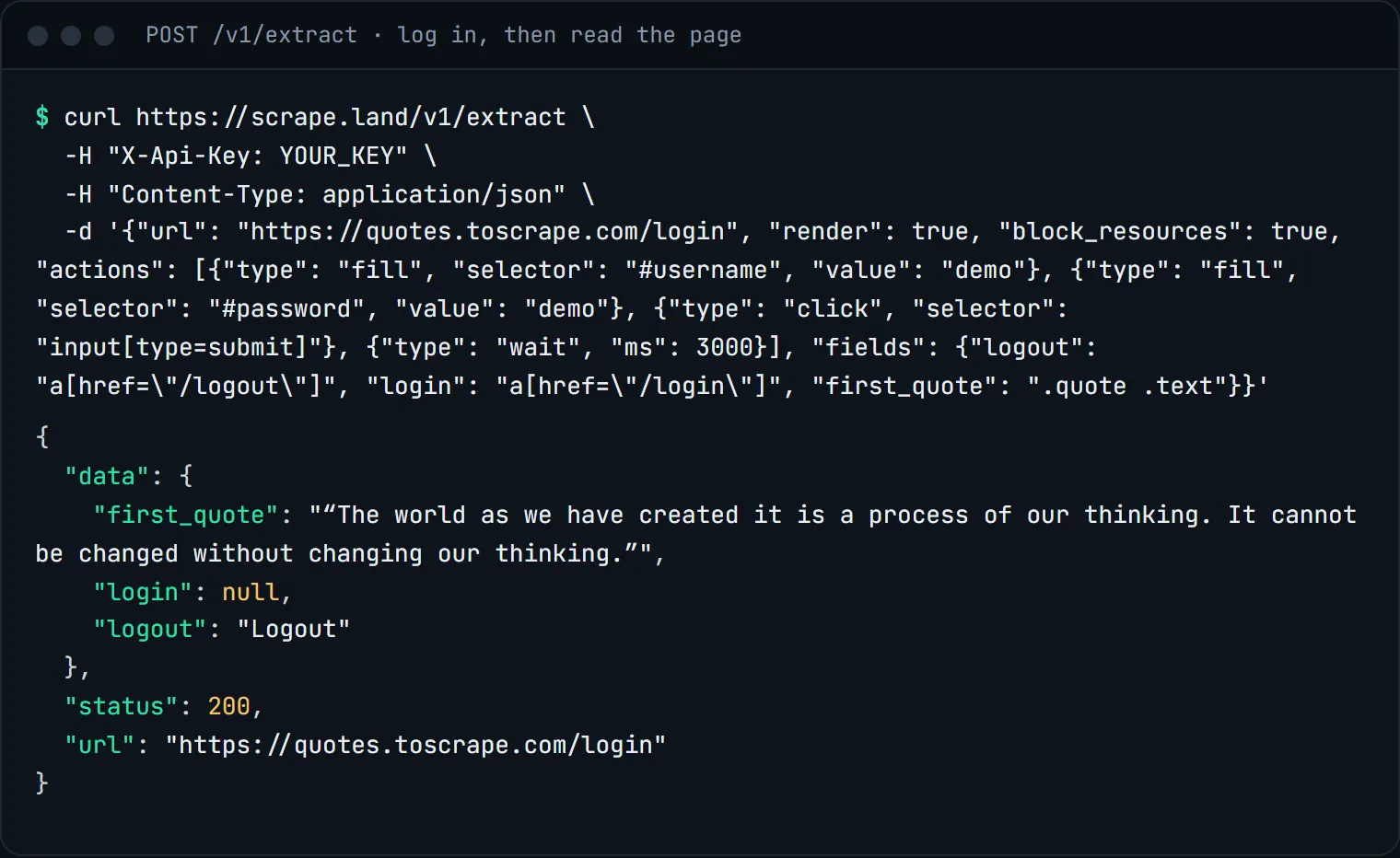
logout is present and login is null: the browser submitted the form and landed on the signed-in page.Note that url in the response is still the URL you asked for, not the page the form sent the browser to. The fields, however, are read from wherever the browser ended up after the last action.
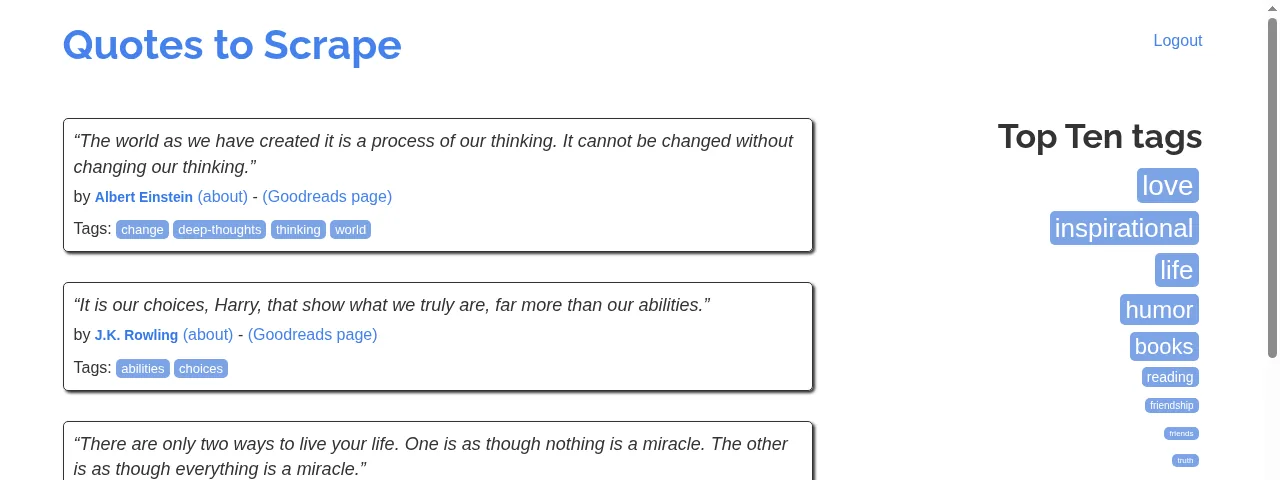
To see what the browser saw, send the same actions to /v1/fetch with "screenshot": true:
The same thing in Python
import requests

actions = [
    {"type": "fill", "selector": "#username", "value": "demo"},
    {"type": "fill", "selector": "#password", "value": "demo"},
    {"type": "click", "selector": "input[type=submit]"},
    {"type": "wait", "ms": 3000},
]
r = requests.post(
    "https://scrape.land/v1/extract",
    headers={"X-Api-Key": "YOUR_KEY"},
    json={
        "url": "https://quotes.toscrape.com/login",
        "render": True,
        "block_resources": True,
        "actions": actions,
        "fields": {
            "logout": 'a[href="/logout"]',
            "goodreads": {"css": ".quote a[href*=goodreads]", "attr": "href", "all": True},
        },
    },
    timeout=150,
)
r.raise_for_status()
data = r.json()["data"]
if not data["logout"]:
    raise SystemExit("login did not go through; check the selectors")
print(len(data["goodreads"]), "author links")
Tips
- After a click that loads a new page, use
wait. In our tests await_forstep placed after a click that navigates to a new page did not return (the request timed out), while a plainwaitof a few seconds worked every time. Usewait_forfor elements that appear on the same page, and the top-level"wait_for"option for the page's first load. - Search boxes work the same way. Fill the input, click the search button (or the first suggestion), wait, then read the results.
- Prefer cookies for real logins. If you already have a session cookie for a site you are allowed to access, sending it with
"cookies"is simpler and cheaper than logging in on every call. See custom headers and cookies. - Keep the exit IP stable. Multi-step flows spread across several calls should share a
"session"name so they leave from the same IP. See sticky sessions. - Only log in where you are allowed to. Use accounts you own and respect the site's terms.
What it costs
Actions need a render: 5 request units, or 1 with "block_resources": true as above. The steps themselves add nothing. The screenshot version bills 10. A render that fails is not billed. See pricing.
Next steps
The actions reference is in the docs. For scrolling feeds, see infinite-scroll pages. Create a free account to try it on the practice site.